Fast, repeatable backups
Copy media from SD cards, source folders, camera cards, and external drives to one or more backup locations with one clear action.
Local-first media workflow
WildCard Backup helps photographers, videographers, and content creators copy, organise, clean, and archive media from SD cards, folders, and external drives without uploading your files to the internet.


Why creators use it
WildCard Backup is built for the real handoff between capture, editing, delivery, and long-term storage.
Copy media from SD cards, source folders, camera cards, and external drives to one or more backup locations with one clear action.
Sort files into useful folders based on metadata so photos, video, and project assets are easier to find when the edit begins.
After confirming backups, clear source cards or folders so your media is ready for the next project instead of filling up in the field.
When a project is complete, move selected files from backup drives to archive storage and free up working-drive space.
Your photos, videos, and media files are copied between locations you choose. They are not uploaded to WildCard Backup servers.
Photographers, video editors, drone operators, and creators can standardise the path from card to backup to archive.
The workflow
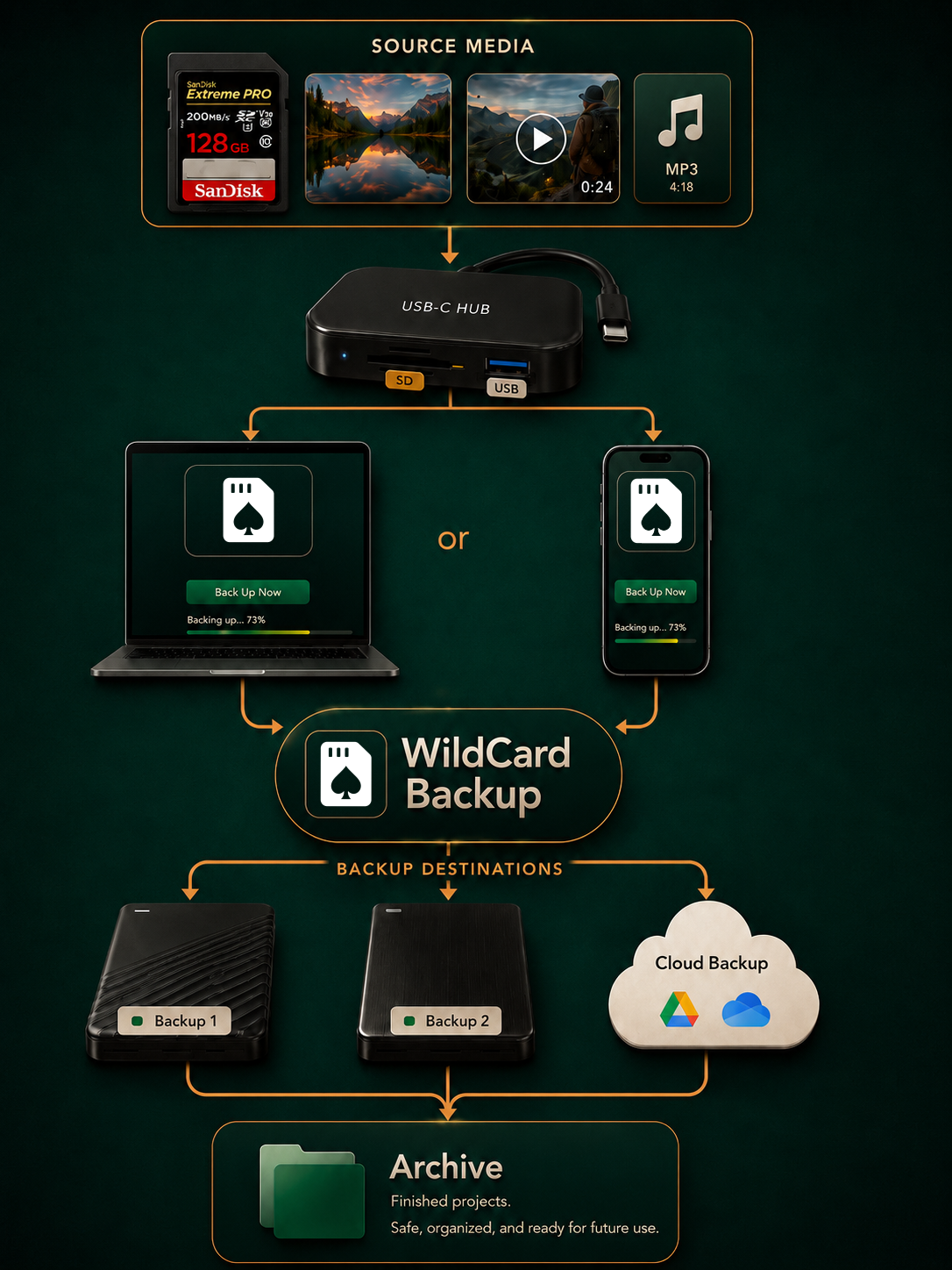

Who it helps
Weddings, client shoots, YouTube productions, drone sessions, events, travel, sports, podcasts, and studio days all create the same pressure: get the media copied, organised, and safe quickly.
Back up camera cards after weddings, portraits, travel shoots, events, and client sessions.
Move large clips from cards and field drives into structured backup and archive locations.
Keep footage, thumbnails, audio, and project media consistent across shoots and platforms.
Offload many small clips quickly before the next flight, ride, trip, or session.
Privacy
WildCard Backup is local-first. Your photos, videos, and media files are copied between drives and folders you choose. They are not uploaded to WildCard Backup servers for backup, organisation, cleaning, or archiving.
Read the Privacy Policy
Questions before download
No. Media backup, organisation, cleaning, and archiving happen locally between the folders and drives you choose.
Yes. You can use source folders, SD cards, media cards, and external drives as part of your backup workflow, depending on what your device and operating system allow.
No internet connection is required for local media backup operations. The internet is only used for app store purchases and links you choose to open, such as support pages.
Yes, where supported. Always confirm your backups before clearing a source card, folder, or drive.
Yes. WildCard Backup supports moving selected files from backup storage to archive storage so your working backup drives have room for future projects.
Download
Download WildCard Backup and start moving media from cards to backups to archives with more confidence.
Available for supported platforms. Media backup is local-first, with no ads, analytics, or tracking.